
After you create your AdoptAClassroom.org Classroom Page, you’ll want to share it with your community. The easiest way to do that is with your custom AdoptAClassroom.org Classroom Page link.
Your classroom page link is a unique URL that helps people find and donate to your classroom directly. Learn how to copy and paste your AdoptAClassroom.org Classroom Page link with our quick video tutorial, or by reading the step-by-step instructions below.
Step One – Log in to Your AdoptAClassroom.org Account
Log in to your AdoptAClassroom.org Classroom Page.
Step Two – View Your AdoptAClassroom.org Classroom Page Link
If your AdoptAClassroom.org Classroom Page is active, you can find your link from the Teacher Dashboard homepage by clicking “Share Your Page.”
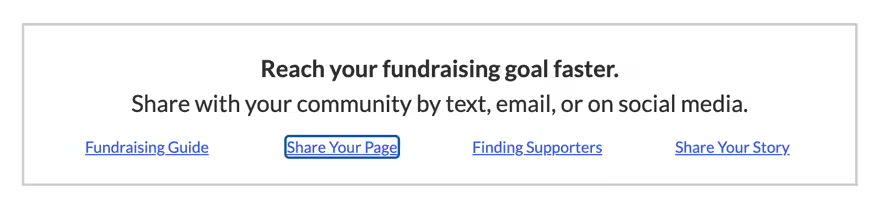
Step Three – Copy Your Classroom Page Link.
Click the “Copy” button in the pop-up box next to your link.
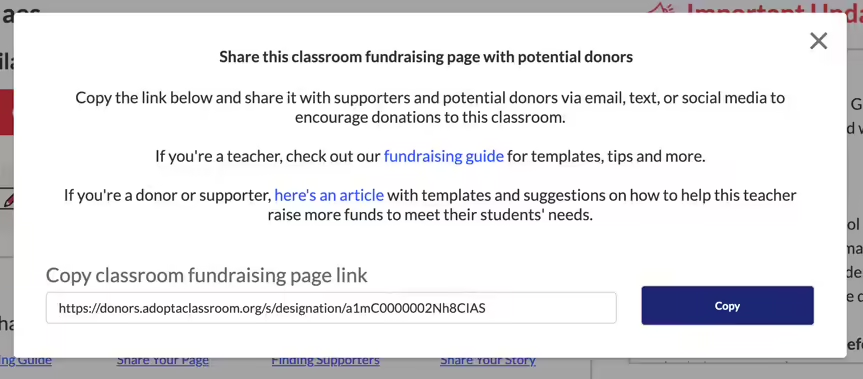
Step Four – Paste Your Link Where You Want it Shared
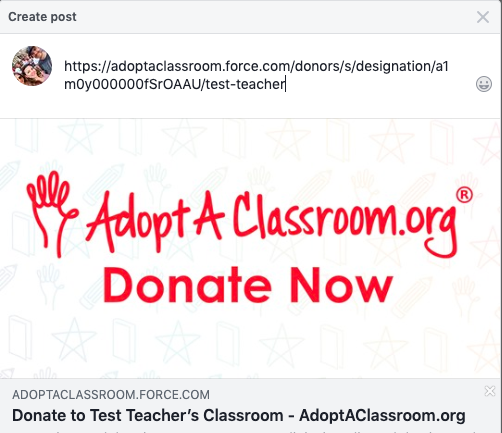
Paste your link into a text, email or social media post by clicking Command + V (Macs) or Control + V (PCs). Check out our Teacher Fundraising Guide for templates and images to customize your request.
If you have any questions for us, please contact us at [email protected].